LBS Piso WiFi: Is It LPB? Compare AdoPiSoft, PisoFi, JuanFi and Other Platforms
If you searched for LBS Piso WiFi, you may be looking for LPB Piso WiFi. The available search results associate the LBS spelling with LPB-related Piso WiFi guides, but there is not enough primary documentation to confirm that LBS is a separate software platform or that every LBS-labelled machine uses LPB.
LPB Piso WiFi is a documented vending software platform with its own customer portal, session management, cloud features and owner controls. Other systems used in the Philippines include AdoPiSoft, PisoFi, JuanFi and 1Click. They can offer similar customer services, but their software, settings and session-management features are different.
To identify the system running on your machine, check the name displayed on its customer portal, the vendo label or the information provided by the operator. Do not identify a platform using the gateway address alone.
Piso WiFi platform guide · Philippines · Platform identification and comparison · Customer-first guide
- LPB: A documented Piso WiFi software platform.
- LBP: A spelling variation that may refer to LPB.
- LBS: A search variation associated with LPB-related results; a separate platform has not been established by the available primary evidence.
- AdoPiSoft, PisoFi, JuanFi and 1Click: Other distinct systems used for Piso WiFi vending.
If your machine displays LBS, ask its owner or installer to confirm the actual software name before following an LPB-specific guide.
1. Quick Comparison of Piso WiFi Platforms
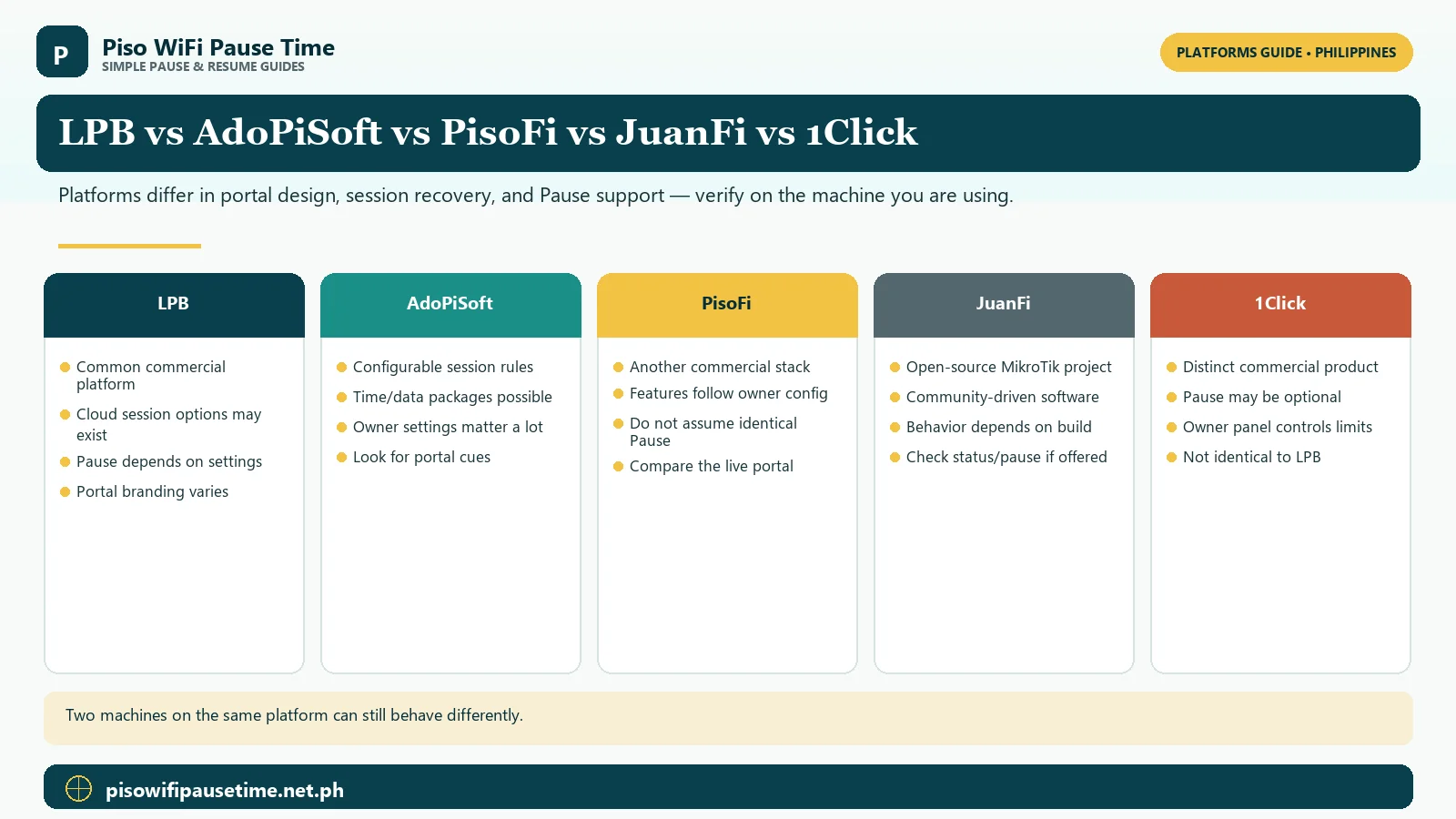
Piso WiFi platforms can provide similar basic services, but their session controls, hardware arrangements and management features are not identical.
| Platform | What distinguishes it | Important consideration |
|---|---|---|
| LPB Piso WiFi | Cloud Session Time, remote monitoring and integrated vending features | Check the licence and supported installation. |
| AdoPiSoft | Configurable time, data and subscription sessions | Pause limits and session expiration depend on settings. |
| PisoFi | WiPass, live time transfer, WiFi and desktop management | Portal and session options are configurable. |
| JuanFi | Open-source MikroTik Hotspot integration | Hardware and software configuration matter. |
| 1Click Piso WiFi | Vending system with documented operational pause rules | Check the actual manual and installed version. |
| WiFi5-Soft | Reported Piso WiFi-related software name | Public primary documentation remains limited. |
A feature listed in software documentation does not mean it is enabled on every machine. The installed version, hardware, licence and vendo owner's configuration can affect what customers see.
2. What Are the Different Piso WiFi Platforms?
Piso WiFi is a prepaid internet-access system commonly operated through coin-operated or voucher-based vending machines. The machine provides a WiFi connection, accepts payment and uses software to manage the customer's internet session.
The software platform controls important functions such as the customer portal, payment options, session duration, remaining time, Pause Time and owner management. Different platforms can provide similar services while using different hardware, network arrangements and software settings.
1. LPB Piso WiFi
LPB Piso WiFi is a commercial vending platform that offers cloud-connected session management, remote monitoring, payment integrations and other business-management features.
One of its distinctive features is LPB Cloud Session Time. According to the provider, customer session time is stored in the LPB Cloud and can remain synchronized across supported LPB machines in different parts of the Philippines.
Other advertised features include:
- Coin-operated WiFi: Customers can insert coins to purchase internet access.
- Cloud Session Time: Remaining customer time can synchronize across supported LPB machines.
- Remote Monitoring: Owners can access and manage their machines remotely.
- Bandwidth Management: Features include Smart Queue Management (SQM), port prioritization and per-user speed limits.
- Buy Time or Buy Data: Customers can purchase time-based or data-based access.
- Voucher System: Owners can create vouchers with customized time or data allowances.
- E-Payments: The platform advertises GCash and Maya payment integration.
- E-loading and Cash-in: The vending machine can offer additional digital services.
- Multi-Subvendo: Multiple sub-vendos can be managed with supported VLAN configurations.
- PPPoE: The platform also advertises PPPoE account management.
- PisoNet and Phone Rental: Additional business functions are available in the LPB ecosystem.
LPB offers different licence plans. Features and restrictions can depend on the selected licence and software version.
What makes LPB different? Its cloud-connected session feature is an important distinction. A customer may be able to access synchronized remaining time on another supported LPB machine, rather than being limited to the original vendo.
Do not treat this as a guarantee that every LPB installation will recover every session after a power interruption. Check the actual machine and provider documentation.
Official source: LPB Piso WiFi.
2. AdoPiSoft
AdoPiSoft is a commercial Piso WiFi management platform with detailed session controls, network management, payment options and vending-machine administration.
One of its important characteristics is its support for different session types.
AdoPiSoft session types include:
- Time Session: Internet access is based on purchased time.
- Data Session: Internet access is based on a purchased data allowance.
- Time with Data Capping: Both time and data limits apply.
- Subscription Session: A session type used for subscription-based or designated device access.
The platform also provides session-management settings that allow owners to control how customer sessions behave.
- Automatically continue sessions after a machine reboot, when configured.
- Enable session cookies for devices moving between access points.
- Automatically pause sessions when the internet connection is unavailable, if enabled.
- Pause a device session when it becomes inactive or disconnects from the Ado WiFi network, if configured.
- Resume a session when the device reconnects, if enabled.
- Set pause limits for specific session types.
- Configure session expiration using time or data conditions.
AdoPiSoft documentation gives a sample configuration allowing ten pauses for certain time and data credit ranges. This is an example setting, not a universal limit for every AdoPiSoft machine.
What makes AdoPiSoft different? Its detailed session-management system lets owners define how time, data, expiration and pause permissions work instead of relying on one fixed session rule for every customer.
This also explains why two AdoPiSoft machines may behave differently. Their owners may use different settings or software versions.
Official sources: Session Settings, WiFi Devices Guide and Session Types Documentation.
3. PisoFi
PisoFi is a separate commercial Piso WiFi software platform with features for WiFi vending, desktop access, charging stations, e-loading and multi-vendo management.
Its published documentation describes a configurable customer portal and an extensive owner management panel.
Customer portal features:
- Display of remaining time and data.
- Connection status indicator.
- Configurable portal buttons.
- Pause and transfer options.
- WiPass voucher access.
- Customizable site name and branding.
- Customer-to-admin chat.
- Sub-vendo selection where available.
Session management:
Live Transfer is one of its distinctive features. It allows remaining time to be transferred from one user's device or account to another, subject to the platform's settings.
PisoFi also documents configurable Pause Time options, including enabling or disabling Pause Time, setting maximum pause duration and validity, pausing users when they disconnect, resuming users when they reconnect, and configuring automatic session behaviour.
Other owner features include WiPass voucher generation, custom internet rates, sales reports, client management, bandwidth allocation, bill acceptor integration, multi-coinslot functionality, charging management, remote machine monitoring and backup/restore options.
What makes PisoFi different? Its combination of WiPass, Live Transfer, desktop management and configurable customer sessions makes it more than a basic coin-operated WiFi portal.
These are documented platform capabilities, not a promise that every installation has all features enabled. Check the installed version and its configuration.
Official sources: PisoFi Features, PisoFi Releases and PisoFi FAQs.
4. JuanFi
JuanFi is an open-source Piso WiFi system designed to integrate a coin-slot vending mechanism with MikroTik Hotspot networking.
Unlike a commercial all-in-one platform, JuanFi uses a combination of hardware components and software configuration.
Its documented hardware requirements include:
- MikroTik router.
- NodeMCU ESP8266 or ESP32.
- Coin acceptor.
- WiFi access point.
- W5500 Ethernet controller for supported LAN-based setups.
- Appropriate power supplies and supporting components.
JuanFi provides wireless-based and LAN-based hardware configurations. Its management features include MikroTik connection configuration, SSID configuration, coin-slot settings, promotional rates, expiration settings, sales reports, dashboard monitoring and custom hardware pin configuration.
What about JuanFi Pause Time?
JuanFi's capabilities can vary by installed release. The v3.3 release notes specifically mention Pause with Remaining Time and automatic voucher resumption when the customer reconnects to WiFi.
These features should be described as version-specific evidence. Older installations or customized builds may behave differently.
What makes JuanFi different? Its open-source architecture and MikroTik integration make it relevant to operators who want more control over vending hardware and network setup.
Open-source software does not mean that installation, compatible hardware, maintenance or internet service are free.
Sources: JuanFi public repository and release history.
5. 1Click Piso WiFi
1Click Piso WiFi is another vending system with a customer portal and owner management functions. Its available system manual describes operational settings that affect how customers use Pause Time.
One particularly important setting is the remaining-time threshold. For example, the reviewed manual demonstrates a configuration in which a customer must have a certain amount of remaining time before the Pause button becomes available.
The manual also describes Allow Pause, automatic pause following an unexpected shutdown when enabled, automatic resume after a configured period, customer portal banner customization and owner-controlled portal options.
What makes 1Click different? Its documented Operational Rules provide an example of conditional pause eligibility. The Pause button may only become available when the current session meets the owner's configured conditions.
The reviewed manual is available through a third-party document host. Owners should confirm the relevant instructions against the manual supplied with their own installation.
6. What Is WiFi5-Soft?
WiFi5-Soft appears in Piso WiFi-related searches and third-party discussions as a software-related name. However, the available evidence does not establish a complete official feature set or a reliable current technical manual.
When encountering a machine described as WiFi5-Soft, check the name displayed on its customer portal, supplier or installer information, actual software version, available documentation and the session features demonstrated on that installation.
Do not assume that WiFi5-Soft has the same functions as AdoPiSoft, PisoFi or JuanFi simply because all are associated with Piso WiFi vending.
7. Other Piso WiFi Software and Machine Names
You may also encounter other names in the Philippine Piso WiFi market, including Ruijie-related deployments, SmartFi, JLink and other locally supplied systems.
It is important to distinguish between a software platform, a router manufacturer, a hardware model, a firmware build, a reseller or installer name, and a custom customer portal. These terms are not interchangeable.
For example, MikroTik is a networking hardware and software ecosystem used by JuanFi. It is not itself the same thing as the JuanFi vending application.
Before treating another name as an independent Piso WiFi platform, look for its actual product documentation, software publisher and identifiable installation.
3. How to Identify Which Piso WiFi Platform Your Machine Uses
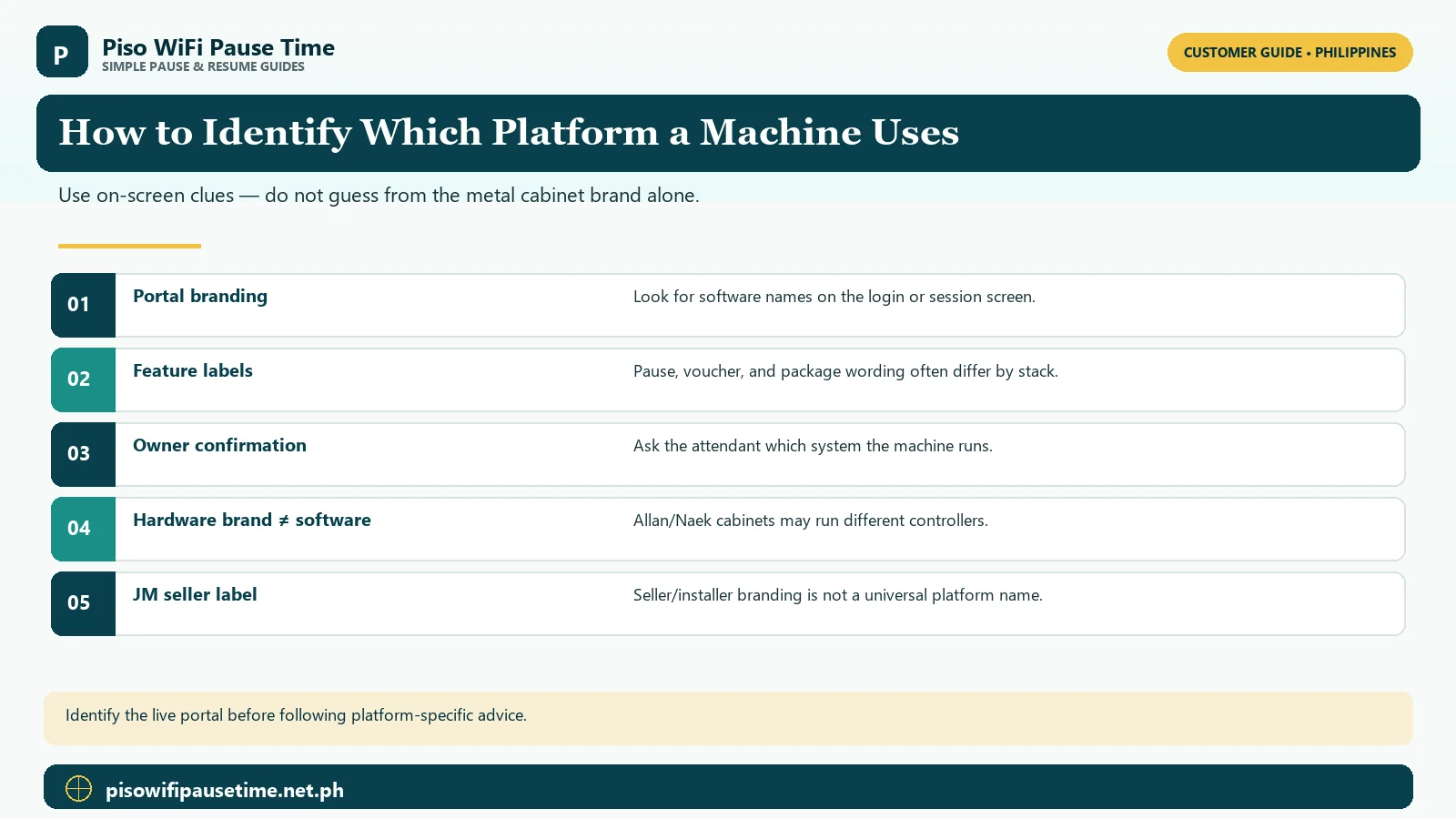
You do not need to understand networking or software development to identify your Piso WiFi system. Start with the customer-facing information available on the machine.
Check the customer portal name. Connect to the Piso WiFi network and open the customer portal. Look for the platform logo, portal title, footer information, copyright or developer details, and version information if displayed. Some operators customize their portal design, so the logo alone may not always be conclusive.
Check the vendo machine label. Look for the brand name, model number, installer label, supplier information, platform name and support contact details. This may help identify the machine's hardware or software provider.
Ask the machine operator. Ask which software is installed, which version is running, whether Pause Time is enabled, whether there are pause restrictions, and what to do if remaining time disappears.
Compare the evidence. Use the portal name, machine label and operator confirmation together. Do not rely on only one clue if the portal has been customized.
No. 10.0.0.1 is a local network address that may be used to access a Piso WiFi customer portal. It does not tell you whether the machine runs LPB, AdoPiSoft, PisoFi, JuanFi or another system.
The local IP address, router, customer portal and vending software are different parts of the setup. Some machines may also use another gateway address. Always check the actual gateway assigned by the connected network rather than assuming every machine uses the same address.
Not reliably. A network name, also called an SSID, can be changed by the machine owner. A vendo may advertise a shop name instead of its software brand. Use the customer portal, machine documentation and operator confirmation together.
- I checked the customer portal branding.
- I checked the machine label.
- I looked for the software version, if available.
- I asked the operator or installer.
- I did not assume the gateway IP identifies the platform.
4. LPB vs AdoPiSoft vs PisoFi vs JuanFi vs 1Click: What Are the Differences?
All these systems can provide prepaid internet access, but their technical arrangements and customer session features differ. The most useful way to compare them is to look at how they manage sessions, payments, hardware and owner controls.
Platform Type and Architecture
LPB, AdoPiSoft and PisoFi are commercial platforms. JuanFi is an open-source project associated with MikroTik Hotspot networking. 1Click is documented through a system manual. These differences matter because licensing, installation, configuration and support arrangements are not necessarily the same.
Supported Hardware and Compatibility
Depending on the platform and build, Piso WiFi installations can use Raspberry Pi or Orange Pi single-board computers, mini PCs, MikroTik routers, NodeMCU ESP8266 or ESP32 controllers, W5500 Ethernet modules, coin acceptors, access points and network switches.
Hardware compatibility is software-specific. A board used by one platform does not automatically support another. Check the platform's own hardware list and the manual for the exact version.
Customer Portal and Login Experience
Customer portals may display remaining time, voucher access, coin payment options, e-wallet payment options, pause/resume controls and session-transfer features. The exact buttons and layout depend on the platform and operator customization.
An identical gateway address does not mean two machines use the same portal software or login workflow.
Session Types and Remaining-Time Management
Platforms may support different combinations of time-based sessions, data-based sessions, combined time-and-data sessions, voucher sessions, wallet sessions and admin-created sessions.
Session type can affect when a customer can pause, resume, transfer or extend access. Remaining time, remaining data and session validity are related, but they are not the same thing.
Payment Methods and Voucher Management
Depending on the system and enabled integrations, payment and access methods may include coins, voucher codes, WiPass, GCash, Maya, e-loading, cash-in, bill acceptors and customer accounts. A payment option advertised by a platform may still require a compatible licence, service or machine configuration.
Remote Management and Sales Monitoring
Owner features can include remote machine status, sales reports, daily and monthly revenue records, user activity, client sessions, sub-vendo management, remote configuration and report exports. Check the current product documentation to see which features are included in a particular plan.
Licensing, Support and Software Updates
Before choosing a commercial platform, check licence validity, user or machine limits, included features, update policy, documentation and supplier support. For open-source systems, also consider installation effort, hardware costs, maintenance and community support.
Which Features Are Configurable Rather Than Guaranteed?
It is important to distinguish between a feature supported by the platform, a feature enabled by the owner, a feature dependent on software version, a feature requiring compatible hardware or a licence, and a claim that has only been reported but not verified.
| Evidence status | Meaning | How to interpret it |
|---|---|---|
| Vendor documented | A first-party product page or technical guide describes the feature. | It is a published platform capability; check version and licence. |
| Manual documented | A system manual describes the behaviour. | Confirm that the manual matches the installed system. |
| Configurable | The owner can enable, disable or adjust the feature. | It may not be available to every customer. |
| Version-dependent | The feature is associated with a particular release or build. | Do not assume older installations support it. |
| Unverified | Available information does not establish the claim. | Do not present it as a confirmed feature. |
5. How Do Different Piso WiFi Platforms Handle Pause Time?
Pause Time is one of the most important customer-facing features, but it does not work in exactly the same way across every system. A platform may support pausing while the machine owner has disabled the feature. Another system may only display the Pause button when the customer meets a particular session condition.
LPB Pause Time
LPB advertises Cloud Session Time, allowing remaining customer time to synchronize across supported LPB machines. Customers should check whether the particular vendo supports the feature and whether the available session controls are enabled.
Do not assume that a local session and a cloud-synchronized session have identical recovery behaviour.
AdoPiSoft Pause Time
AdoPiSoft documents several session controls, including allowing or disabling session pause, setting the number of allowed pauses, configuring session expiration, and automatic pause or resume conditions when enabled. The actual settings depend on the session type and owner's configuration.
PisoFi Pause Time
PisoFi documents settings that allow owners to enable or disable Pause Time, set maximum pause duration and validity, pause users when disconnected from WiFi, resume users when they reconnect, and configure automatic session behaviour. The available options should be checked against the installed version.
JuanFi Pause Time
JuanFi's v3.3 release notes mention Pause with Remaining Time and automatic voucher resumption when a device reconnects to WiFi. Because JuanFi is configurable and open-source, different installations may have different customer-facing pause controls.
1Click Pause Time
The reviewed 1Click system manual describes Allow Pause, a remaining-time eligibility threshold, automatic pause after an unexpected shutdown when enabled, and automatic resumption after a configured duration. This means the Pause button may only become available after the session reaches the required remaining-time condition.
What Happens to Remaining Time After a Power Interruption?
This depends on how the installed system stores and restores sessions. Some systems document session continuation or recovery settings. Others provide cloud synchronization or configurable power-interruption behaviour. Do not assume that every paused session will survive a router restart or brownout.
Reconnect to the same machine's WiFi. Use the network where you started the session, if it is available.
Open the customer portal. Check whether your session is still active or paused.
Do not immediately purchase another session. If you believe the previous balance is missing, first ask the operator to check the session record.
Give the operator useful details. Share the approximate payment time, machine location and remaining balance you expected.
6. Why Do Two Machines Using the Same Piso WiFi Platform Behave Differently?
Two vendo machines can use the same software platform but provide different customer experiences. This does not necessarily mean one machine is broken.
Software Version and Firmware
An older software build may not contain the same features as a newer release. Updates can change session controls, pause options, portal layout, payment features, hardware support and automatic resume behaviour.
Owner-Configured Settings
Machine owners can configure different options. One owner may enable Pause Time while another disables it. One machine may require a minimum remaining balance, while another allows pausing at a different threshold. One installation may use automatic resume while another requires customers to resume manually.
Different Session Types
A time-based session and a data-based session do not necessarily follow the same expiration rules. For example, a customer may have remaining data but no longer have a valid session period. Remaining time, data allowance and session validity should not be treated as the same thing.
Hardware and Network Configuration
The same software can run with different hardware arrangements. These may include MikroTik routers, Raspberry Pi or Orange Pi boards, NodeMCU ESP8266 or ESP32 controllers, wireless or LAN-based connections, different access points and different coin acceptors.
Customized Customer Portals
Machine owners may change portal logos, colours, site names, banner images, customer buttons, payment options and session displays. Two machines running the same platform may therefore look different.
One AdoPiSoft machine displays a Pause button, while another does not. The second machine may have Pause disabled, a different session rule or a different software build. Check session eligibility and ask the owner rather than assuming the software is unsupported.
7. Which Piso WiFi Platform Is Best for Customers and Vendo Owners?
There is no single platform that is best for everyone. The right choice depends on whether you are a customer using a vendo or an owner selecting software for a vending business.
What Should Customers Look For?
- A working internet connection.
- A clear customer portal.
- Easy-to-understand remaining-time information.
- Visible Pause and Resume controls, if supported.
- Clear payment and voucher instructions.
- A reliable way to contact the machine operator.
- Transparent session expiration rules.
The platform name alone does not guarantee a better customer experience. A well-maintained machine with good internet service can be more useful than a poorly configured machine running a feature-rich platform.
What Should Vendo Owners Consider?
Use the factor checklist below before selecting software for a vending business.
| Factor | What to check |
|---|---|
| Hardware compatibility | Supported routers, boards and coin acceptors. |
| Software licence | Cost, validity and feature restrictions. |
| Session management | Time, data, expiration and pause controls. |
| Payment integration | Coins, vouchers and supported e-wallets. |
| Remote management | Machine monitoring and administration. |
| Sales reporting | Daily/monthly reports and transaction records. |
| Sub-vendo support | Multiple machines or vending points. |
| Technical documentation | Setup, updates and troubleshooting guides. |
| Customer portal | Branding and user experience. |
| Support | Supplier or developer assistance. |
| Backup and recovery | Data backup and machine restoration procedures. |
Which Platform Is Suitable for Advanced MikroTik Users?
JuanFi may be worth evaluating for owners who prefer open-source software and MikroTik Hotspot integration. However, its hardware setup and configuration require appropriate technical knowledge.
Which Platform Is Suitable for a Feature-Rich Vending Business?
LPB, AdoPiSoft and PisoFi publish broad management and vending capabilities. Compare their current licence conditions, hardware requirements and documentation before choosing.
Can You Switch From One Piso WiFi Platform to Another?
A platform change is not always a simple software replacement. Before switching, check:
Do not assume that customer time, vouchers or account balances will automatically transfer between different software systems.
8. Frequently Asked Questions About Piso WiFi Platforms
Is AdoPiSoft the Same as Ado Piso WiFi?
AdoPiSoft is the software platform name. People may use the shorter phrase "Ado Piso WiFi" when referring to a machine running AdoPiSoft.
Is LPB the Same as LBP Piso WiFi?
LPB is the documented platform name. LBP is a spelling variation that may refer to the same system. Confirm the name through the machine's portal or operator.
Is LBS Piso WiFi the Same as LPB?
The available search evidence associates LBS with LPB-related searches, but it does not conclusively establish LBS as either a separate platform or a universal spelling mistake. Check the actual machine branding and supplier documentation.
Is PisoFi a Separate Piso WiFi Platform?
Yes. PisoFi has its own product website, feature documentation and release information. Its published capabilities include WiPass, session management, Live Transfer and configurable portal features.
Is JuanFi Free and Open Source?
JuanFi is published as an open-source project under the Apache 2.0 licence. However, compatible hardware, installation, maintenance and internet service can still involve costs.
Is 1Click Piso WiFi the Same as LPB or AdoPiSoft?
No. The reviewed 1Click manual describes a separate vending system. Its portal, owner settings and pause rules should not automatically be treated as LPB or AdoPiSoft instructions.
What Is WiFi5-Soft Piso WiFi?
WiFi5-Soft is a name appearing in Piso WiFi-related references. However, its full product identity and technical feature set have not been established by sufficient primary documentation.
What Does Piso WiFi 5G Mean?
The phrase may refer to a particular machine, network or service. It should not automatically be treated as the name of a separate software platform or confused with WiFi5-Soft.
Do All Piso WiFi Platforms Use 10.0.0.1?
No. It is a commonly used local gateway address, but the actual address depends on the machine's network configuration.
Does Every Piso WiFi Platform Support Pause Time?
No universal guarantee applies. Feature availability depends on the platform, version, session type and operator settings.
Can I Transfer My Remaining Piso WiFi Time to Another Phone?
Some systems document time-transfer functionality, including PisoFi Live Transfer and LPB Cloud Session Time across supported machines. This does not mean every platform or installation allows transfers.
Does My Piso WiFi Time Disappear After a Power Interruption?
Not necessarily. Session recovery depends on the platform's storage and recovery settings. Reconnect to the same machine and ask the operator to check the session if your remaining time is missing.
Do I Need an App to Identify My Piso WiFi Platform?
Usually not. Start with the customer portal, machine label and operator information. You do not need to access the owner's admin dashboard just to identify the platform.
10. Sources and Further Reading
The following first-party and technical sources support the platform descriptions and feature explanations in this guide.
- LPB Piso WiFi – Official platform and features.
- AdoPiSoft – Official Session Settings Guide.
- AdoPiSoft – WiFi Devices and Session Management.
- AdoPiSoft – Session Types Documentation.
- PisoFi – Official Features.
- PisoFi – Official Release Notes.
- PisoFi – Official FAQs.
- JuanFi – Public Source Repository.
- JuanFi – Release History.
- 1Click Piso WiFi – Reviewed System Manual.
Platform features can change with software updates, licences and operator settings. Official documentation and the manual for the installed version should take priority over generic online instructions. Information about LBS and WiFi5-Soft remains qualified where independent primary evidence is unavailable.