What Is Piso WiFi? How It Works in the Philippines
Piso WiFi is a prepaid public WiFi hotspot service commonly found in the Philippines. It allows people to connect their phones, laptops, and other WiFi-enabled devices to a shared internet connection and pay for access using the payment methods supported by the operator, such as coins or vouchers.
In simple terms: Piso WiFi lets customers pay for shared wireless internet access without needing to subscribe to the hotspot themselves. The exact price, session duration, payment options, and features depend on the machine and its operator.
START HERE
What Piso WiFi means in practice
Piso WiFi is a prepaid public WiFi hotspot service. Customers connect their own devices, open the captive portal, pay with coins, vouchers, or another supported method, and receive a session that may be limited by time, data, or both.
The name is associated with affordable, pay-per-use internet access. However, it does not mean every machine must charge exactly ₱1 or provide the same amount of internet for that payment. Operators can set different prices and access options.
What Does Piso WiFi Mean, and How Did It Develop in the Philippines?
The term Piso WiFi combines the Filipino word piso, meaning one peso, with WiFi, the wireless technology used to connect devices to a network. The name is associated with affordable, pay-per-use internet access. However, it does not mean every machine must charge exactly ₱1 or provide the same amount of internet for that payment. Operators can set different prices and access options.
What Does the Term Piso WiFi Mean?
Piso WiFi generally refers to a prepaid wireless hotspot service where customers pay for internet access through a local vending or payment system. A customer might insert coins into a vendo machine and receive a certain amount of internet access. Another machine might let customers enter a voucher code instead. Customers purchase access to a shared hotspot; they are not necessarily buying a fixed amount of internet from a nationwide provider.
How Did Piso WiFi Develop in the Philippines?
Piso WiFi developed within the Philippines' broader culture of low-cost, coin-operated services, sometimes called piso-gadgets. A UNDP Philippines article about the Piso-gadget scene in Quiapo documents early examples of Piso WiFi vending machines. It describes people modifying older routers by installing different firmware and creating landing pages to make internet access easier to purchase.
This provides evidence of a grassroots development context in the Philippines, but it does not establish one confirmed inventor or a definitive founding year. The service became a way to access the internet in short, affordable sessions, especially where customers might not have their own broadband or mobile data available.
Is Piso WiFi the Same as Every Coin-Operated WiFi Service?
No. Piso WiFi describes a type of prepaid hotspot service, not one universal machine or software platform. Operators may use different vendo designs, coin acceptors, routers, access points, hotspot software, captive portals, ISPs, prices, and session rules. Two machines with the Piso WiFi label may therefore offer different experiences.
- Vendo designs
- Coin acceptors
- Routers
- Access points
- Hotspot software
- Captive portals
- ISPs
- Prices
- Session rules
How Does Piso WiFi Work?
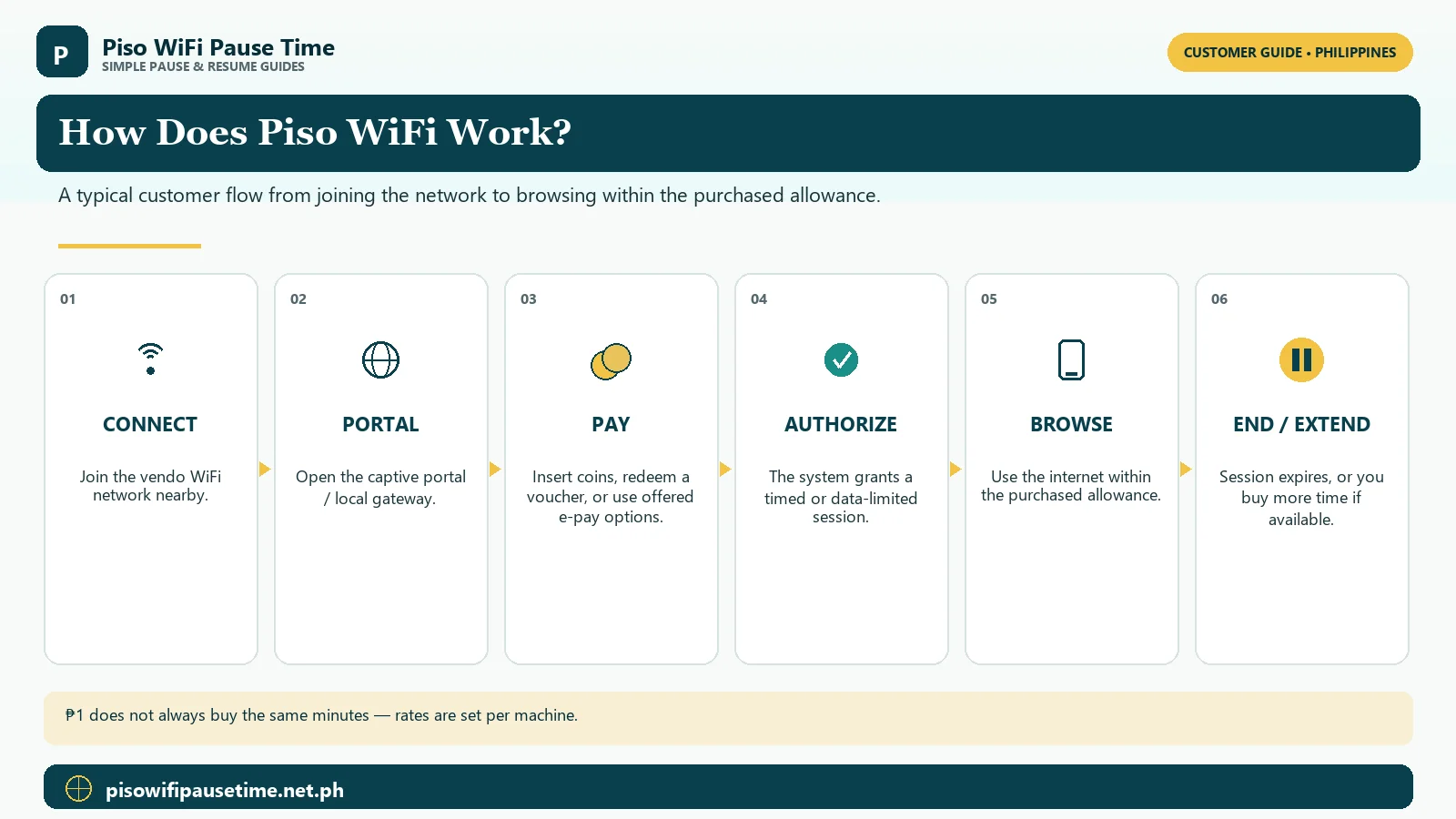
Piso WiFi connects a customer's device to a shared wireless hotspot and uses a payment and session-management system to control internet access. The usual process is: connect to WiFi, open the captive portal, select an access option, pay, receive an authorized session, and use the internet until the allowance expires or is extended.
Customer journey: Connect to hotspot → open portal → pay or redeem → session authorized → use internet → expiry or extension.
The customer opens WiFi settings on a phone, laptop, tablet, or other wireless device. The device displays nearby network names, called SSIDs (Service Set Identifiers). The customer selects the correct Piso WiFi network. The device may connect to the wireless network before internet access is authorized, so payment may still be required.
A login or payment page may appear automatically. This is called a captive portal: a web page that displays access options and controls who can use the hotspot's internet connection. Depending on the system, it may show payment options, coin or voucher instructions, time or data allowances, login fields, session information, and pause controls if supported. Some devices may require the user to open a browser.
- Coin payment: The customer inserts supported coins into the vendo machine.
- Voucher access: The customer enters a prepaid voucher code if offered.
- Other payment methods: Some systems support additional operator-configured options.
Not every hotspot accepts every payment type. A payment must be recognized by the system before access is granted. If payment is accepted but the session does not start, check the portal or ask the operator for help.
After payment or voucher validation, the hotspot system processes the access request. The controller or software checks the payment and applies session rules, such as time, data, expiry, pause, and extension options. When authorization succeeds, the customer's device is allowed to use the internet.
The customer can open websites, use applications, watch videos, and send messages within the connection's limits. The system tracks time or data according to its configuration. Performance also depends on the ISP connection, WiFi signal, equipment, number of connected users, and speed restrictions.
A session usually ends when the applicable time, data, or expiry limit is reached. If the operator supports additional payments or vouchers, the customer may be able to purchase more access. Disconnecting, pausing, or reconnecting does not have the same result on every system.
Connecting to WiFi, paying for access, and receiving an authorized internet session are three different stages. A successful wireless connection alone does not guarantee internet access.
What Parts Make Up a Piso WiFi System?
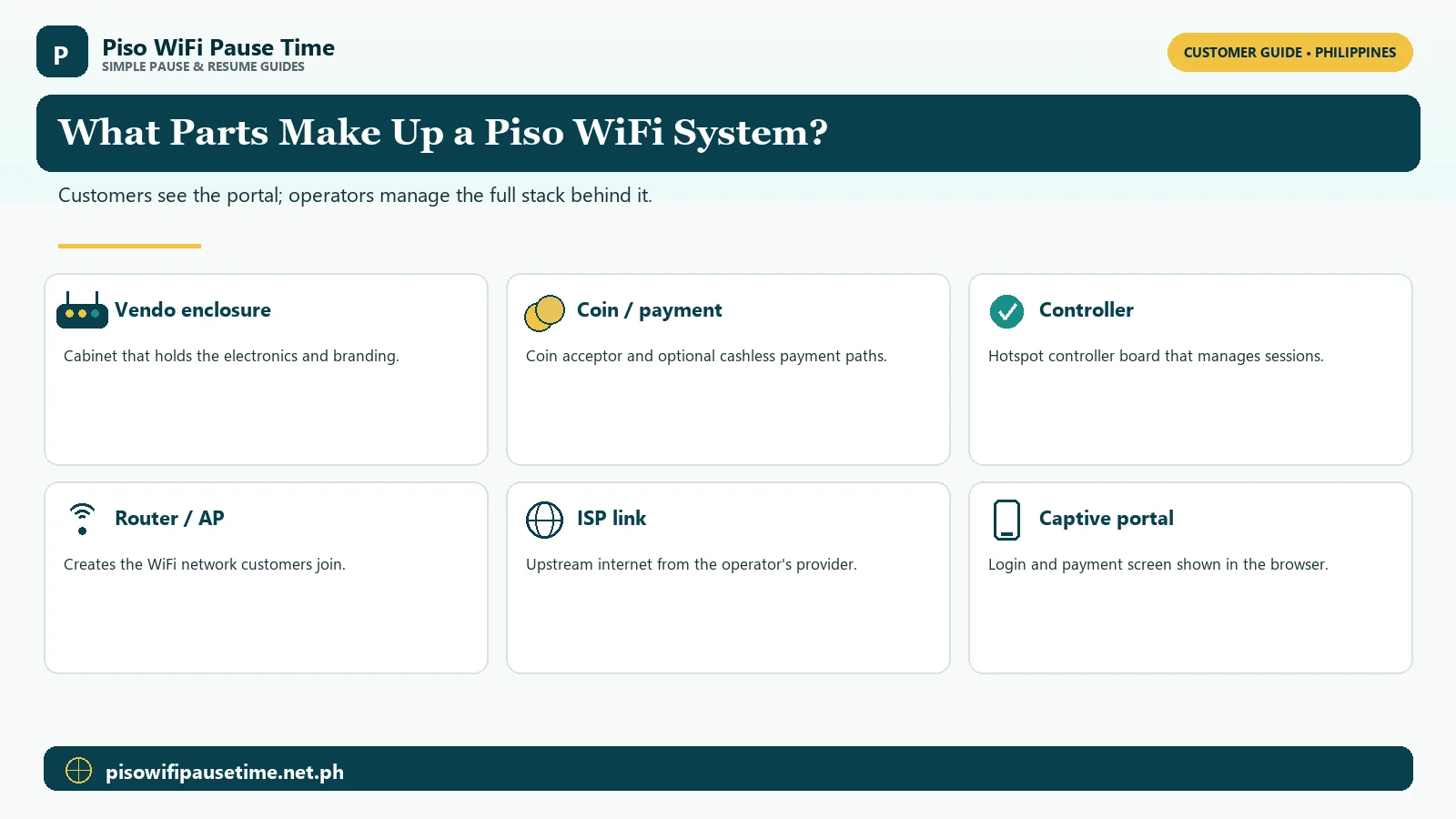
A Piso WiFi setup is more than a coin slot inside a box. It combines physical equipment, network hardware, an internet connection, and software that manages payments and sessions. The exact arrangement varies by machine.
Vendo Machine or Enclosure
The enclosure houses or protects the equipment. It may contain a coin slot, payment interface, controller board, power supply, and networking parts. Some designs are compact boxes; others have space for additional equipment.
Coin Acceptor and Payment Interface
The coin acceptor detects supported coins and sends a signal to the controller or payment system. The system processes the payment according to its settings. The coin acceptor does not independently provide internet access. If a payment is not detected correctly, a session may not start even though a coin was inserted.
Controller Board or Hotspot Controller
The controller coordinates functions inside the vending system. Depending on the design, it processes payment signals, communicates with hotspot software, and helps manage sessions and access rules.
Router and Wireless Access Point
The router connects the local network to the internet and manages network traffic. The wireless access point broadcasts the WiFi signal customers see on their devices. These functions may be combined in one device or handled by separate devices. Signal strength depends on equipment, location, distance, walls, and interference.
Internet Service Provider Connection
The Internet Service Provider (ISP) supplies the connection that lets the hotspot reach the internet. An operator may use suitable fiber, wired broadband, or mobile broadband. If the upstream connection fails, the WiFi network may remain visible even though customers cannot browse.
Captive Portal and Management Software
The captive portal is the customer-facing payment or login page. Management software works behind the scenes to control access, payment validation, sessions, time and data allowances, voucher access, expiry, pause options, connected devices, and system status. The operator may have a separate management dashboard.
Power Supply and Network Cabling
The power supply runs the machine, router, controller, and other equipment. Network cables connect devices through wired links. A power interruption can shut down equipment; a failed cable or connection can also interrupt communication.
The payment interface sends a signal; the controller and software process access; the router and access point provide network connectivity; the ISP supplies internet access; and the captive portal lets the customer interact with the system.
See our Piso WiFi vendo guide for more about equipment and operator considerations.
What Can Customers Pay For and Receive?
Customers do not always purchase the same type of internet allowance. Some systems provide access based on time, others use data limits, and some combine both. The operator decides which options are available.
Time-Based Internet Access
Time-based access gives the customer a defined period, such as a number of minutes or hours. The platform tracks time according to its settings. Access may end when the allowance is used or the configured expiry is reached.
Data-Based Internet Access
Data-based access gives the customer a defined amount of internet data, usually measured in megabytes (MB) or gigabytes (GB). The allowance may run out regardless of how long the device has been connected, subject to any additional expiry rules.
Combined Time and Data Limits
Some platforms support sessions with both time and data restrictions. Access may stop when either configured limit is reached. A customer could still have time remaining but run out of data, or have data remaining after the time limit expires.
Coin Payments, Vouchers, and Other Options
Customers may pay with coins, enter a voucher, or use another method supported by the operator. A voucher is a code representing prepaid access. Depending on its settings, it may provide time, data, or another allowance. Not every machine offers vouchers.
AdoPiSoft documentation describes time sessions, data sessions, and combined time-and-data configurations. These are platform capabilities, not a guarantee that every machine uses the same system. See AdoPiSoft session settings.
If you have a voucher, read our Piso WiFi voucher code guide.
Why Does ₱1 Not Always Buy the Same Amount of Internet?
There is no single nationwide Piso WiFi rate that every operator must use. Prices and allowances may depend on the operator's pricing decisions, ISP and operating costs, location, customer demand, platform, session limits, and payment options. Check the rate displayed by the machine before paying.
Operators can use our Piso WiFi rate calculator to calculate their own pricing using entered rates and costs. It is not an official national rate table.
Why Do Piso WiFi Features Differ Between Machines?
Machines can look similar but behave differently because they may use different hotspot platforms, hardware, and operator settings. A feature available on one machine may be missing or configured differently on another.
The Hotspot Platform Determines Available Features
Hotspot software manages the customer portal, payment processing, sessions, and access rules. Examples in the Piso WiFi environment include LPB Piso WiFi, AdoPiSoft, PisoFi, and JuanFi. These are different platform options, not one universal system. Features may differ in portal design, session tracking, payment methods, vouchers, and management tools.
LPB Piso WiFi
Platform option used by some operators for portal, payment, and session management.
AdoPiSoft
Platform option with documented session settings, pause options, and voucher features.
PisoFi
Platform option with its own portal design and voucher-related tooling.
JuanFi
Another platform option in the Piso WiFi environment—not a universal standard.
See our Piso WiFi platforms guide.
Operator Settings Control Rates and Access Rules
Even operators using the same platform may configure different payment amounts, time and data allowances, session expiry, voucher availability, maximum users, pause limits, and access restrictions.
How Does Piso WiFi Pause Time Work?
Pause time may let a customer temporarily stop an eligible session and continue later. It is not guaranteed on every machine. Depending on the platform, a pause button may appear; a session may pause automatically when a device disconnects or becomes inactive; a timer may continue after disconnection; or the operator may set pause limits and expiry rules.
Disconnecting from WiFi does not automatically mean the session has been paused. Check the portal or ask the operator about that hotspot's rules.
What Happens When the Machine Loses Power or Internet?
- Power interruption: The machine or networking equipment may shut down.
- Internet outage: The WiFi network may remain visible, but the hotspot cannot reach the internet.
- System reboot: Equipment restarts and the platform reloads its settings and session information.
Some platforms offer session recovery. AdoPiSoft documents an option to continue sessions after reboot and settings that can pause sessions during an internet outage and resume them when connectivity returns. These features depend on the software and configuration; they are not universal.
What Is 10.0.0.1 in Piso WiFi?
10.0.0.1 is a private local IP address that may be used by some Piso WiFi networks for a customer portal or network gateway. It is not universal; other setups may use different addresses or portal methods.
Distinguish the customer portal, used to view access options, pay, enter vouchers, or manage an eligible session, from the admin dashboard, used by the operator to manage the machine, settings, users, and system functions. An address for customer access is not necessarily the operator dashboard address.
10.0.0.1
Not universal · follow the machine label
For portal access, follow our Piso WiFi login guide.
Where Is Piso WiFi Commonly Used in the Philippines?
Piso WiFi is associated with places where people want convenient, short-term internet access without using their own mobile data. Availability depends on local demand and the operator.
Small Stores and Sari-Sari Stores
Some operators place machines near sari-sari stores and small shops. Customers may connect while shopping, waiting, or spending time nearby.
Public Waiting Areas and Transport Locations
Hotspots may be found in waiting areas, transport terminals, and other places where people spend time before travelling. Actual availability depends on the location and operator.
Neighborhoods and Community Locations
In residential communities and barangays, a shared hotspot may provide another option for occasional internet access. Usefulness depends on coverage, connection quality, price, and the number of users.
Schools and Commercial Areas
Machines may be located near schools, markets, or commercial areas. Their presence does not mean every school or property permits commercial WiFi vending. Operators should obtain required permission and follow location rules.
How Is Piso WiFi Different From Pisonet, Home WiFi, and Mobile Data?
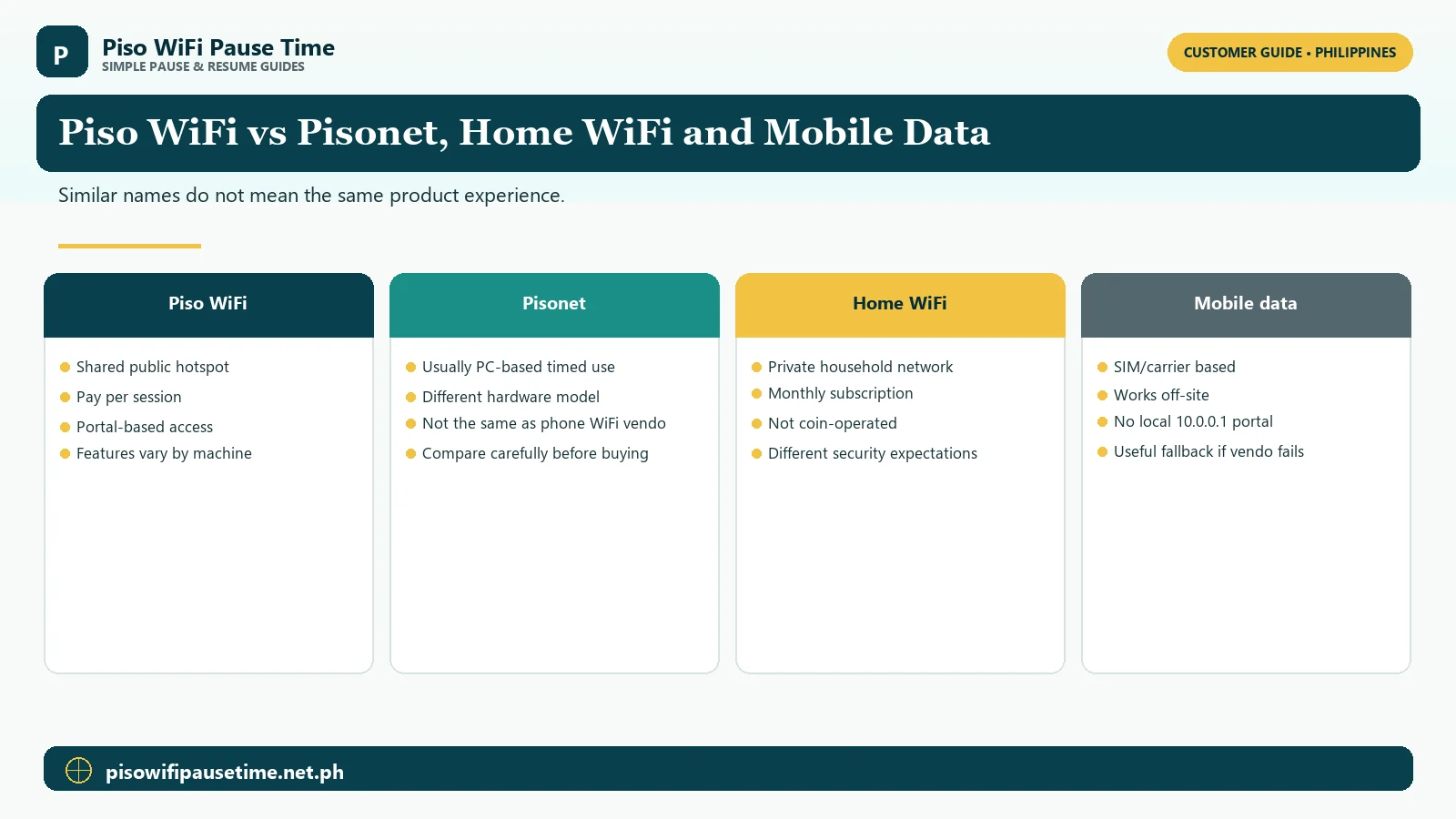
These services all provide internet access, but they use different access methods and payment arrangements.
Piso WiFi vs. Pisonet
Piso WiFi lets customers connect their own WiFi-enabled devices to a shared hotspot.
Pisonet traditionally refers to a standalone internet kiosk or computer that customers use at the location, often by inserting coins to purchase time.
The key difference is personal-device hotspot access versus access through the kiosk's computer. The UNDP Philippines account documents this distinction.
Piso WiFi vs. Home WiFi
Piso WiFi vs. Mobile Data
| Feature | Piso WiFi | Pisonet | Home WiFi | Mobile data |
|---|---|---|---|---|
| Access device | Customer's own device | Usually on-site computer | Household devices | Mobile device |
| Connection | Shared WiFi hotspot | Internet-connected kiosk | Private household WiFi | Cellular network |
| Payment | Operator-defined prepaid access | Usually pay-per-use | Subscription or prepaid broadband | Mobile data plan |
| Location | Within hotspot coverage | At the kiosk | Within home coverage | Within cellular coverage |
| Session control | May use time or data limits | Usually kiosk-controlled | Account and router | Mobile plan |
Is Piso WiFi Safe? Can the Owner See Your Browsing History?
Piso WiFi can be used for ordinary internet activities, but it is still a shared public WiFi connection. Users should take precautions when connecting to a network they do not control. It is also important to understand what an operator may observe and what encrypted websites protect.
Is It Safe to Connect to a Piso WiFi Hotspot?
The concern is that customers use a shared network that may be managed by someone they do not know. Risks include fake networks with similar names, insecure websites, harmful or fraudulent sites, sharing sensitive information over an untrusted connection, and devices automatically joining unknown networks.
The Philippine National Privacy Commission has advised users to take precautions on public WiFi, including using a VPN where appropriate and visiting encrypted websites.
Can a Piso WiFi Owner See Your Browsing History?
A Piso WiFi owner may be able to see some information about connected devices and network activity, but that does not mean the owner can automatically read everything you do online.
Depending on the software, logging, and network configuration, an operator may see connected devices, session start and end times, session duration, data usage, device or session identifiers, and some network information such as destination IP addresses or domain-related information.
HTTPS provides an important layer of protection. With properly configured HTTPS, much of the information exchanged between your browser and a website is encrypted. This generally protects page contents, passwords, form submissions, and messages from someone simply monitoring the local WiFi connection.
HTTPS does not make every detail invisible. Some connection information, such as IP addresses and certain domain-related information, may still be observable depending on DNS and network configuration.
An operator may see some connection and session information, while properly encrypted website traffic protects much of its content. Both "the owner sees everything" and "the owner sees nothing" are misleading.
How Can You Use Public WiFi More Safely?
- Check the network name. Confirm you are connecting to the correct WiFi network.
- Use HTTPS websites. Avoid entering sensitive information on sites showing security warnings.
- Keep your device updated. Install operating system and browser security updates.
- Turn off automatic WiFi connection. Prevent your device joining unknown networks without your knowledge.
- Avoid sensitive transactions on untrusted networks. Mobile data or a trusted connection may be better for banking or private information.
- Use a reputable VPN when appropriate. It can encrypt traffic between your device and the VPN service, but does not make every activity anonymous.
- Enable two-factor authentication. Add another layer of account protection.
- Forget unfamiliar networks when finished. Reduce the chance of automatic reconnection.
See the National Privacy Commission's advice on protecting yourself when using public WiFi.
Is Piso WiFi Legal in the Philippines?
The legality of a particular Piso WiFi operation depends on the actual service arrangement, applicable regulations, the internet provider's contract, and other relevant requirements. It is not accurate to say every setup is automatically legal or automatically illegal.
Does Philippine Regulation Apply to Every Piso WiFi Setup in the Same Way?
The National Telecommunications Commission (NTC) regulates telecommunications services and has rules concerning Value Added Services (VAS). NTC Memorandum Circular No. 02-05-2008 sets out VAS categories and registration requirements for entities providing services within its scope.
However, the existence of these rules does not by itself establish that every small retail Piso WiFi vending setup automatically falls into the same regulatory category. The actual service arrangement matters. Operators should not assume rules do not apply, but should also avoid claims that every setup has an identical registration requirement.
See the NTC Memorandum Circular No. 02-05-2008 in the Supreme Court E-Library.
Can an Internet Subscription Be Used for Commercial WiFi Resale?
Operators should check the exact terms of the internet subscription used for the hotspot. Some residential agreements restrict resale or commercial use without written permission. For example, PLDT's published Home terms state that customers must obtain prior express written consent before reselling or making commercial use of the service. This is a PLDT-specific example, not proof that every ISP has identical terms.
Read the provider's agreement and ask the ISP for clarification or written permission where necessary. See PLDT Home terms and conditions.
What Should an Operator Check Before Offering Piso WiFi?
- ISP agreement: Does the plan allow the intended commercial use or resale?
- NTC requirements: Does the actual service arrangement fall under a regulated category?
- Business requirements: Are registrations or local requirements applicable?
- Property permission: Is installation and operation allowed at the location?
- Equipment and network: Is the system configured and maintained appropriately?
If the regulatory position is unclear, ask the NTC or seek advice from a qualified legal professional.
Do not rely on a blanket statement that Piso WiFi is legal or illegal. Check the actual business model, ISP contract, and applicable rules.
What Are the Advantages and Limitations of Piso WiFi?
Piso WiFi offers a convenient way to purchase short-term internet access, but its value depends on price, network quality, coverage, session rules, and hotspot security.
Advantages of Piso WiFi
- Pay-per-use access: Customers can purchase a session without subscribing to a separate broadband plan for that hotspot.
- Convenience: Connect using a phone, laptop, or other WiFi-enabled device.
- Flexible access options: Some systems support coins, vouchers, or other payment methods.
- Different session choices: Access may be time-based, data-based, or combined.
- Local availability: Hotspots offer another internet option in stores, communities, and waiting areas.
Limitations of Piso WiFi
- Limited coverage: The signal reaches only the hotspot's coverage area.
- Variable speed: Performance depends on the ISP connection, equipment, signal, and active users.
- Session limits: Access may expire when a time or data allowance is used.
- Different features: Pause time, vouchers, and other options are not available on every machine.
- Public network risks: Users should take precautions on shared connections.
- Possible interruptions: Power failures, equipment problems, and ISP outages can affect access.
Does Piso WiFi Always Provide Cheap or Fast Internet?
Not necessarily. A low payment does not automatically mean unlimited access, high speed, or a long session. Value depends on the allowance offered and connection quality. Check the displayed rate and session conditions before paying.
What Should You Check Before Using a Piso WiFi Hotspot?
Before paying, check the network, payment options, and session rules. This can prevent confusion if the machine behaves differently from another hotspot you have used.
Check the Correct WiFi Network
Confirm the correct WiFi name with the store or operator. Do not assume a network is genuine just because its name includes "Piso WiFi." A fake hotspot may use a similar name.
Review the Available Payment and Session Rules
Before inserting coins or entering a voucher, check the payment amount, time allowance, data allowance if displayed, expiry conditions, supported payment methods, and whether pause or resume is supported. Do not assume the rate or features match another machine.
Understand the Portal Before Paying
Read the captive portal instructions. Check what the payment provides and whether another confirmation step is required. If the instructions are unclear, ask the operator before paying.
Know What to Do If Internet Access Does Not Start
- Check that your device is connected to the correct WiFi network.
- Check whether the portal confirms payment or voucher acceptance.
- Reopen the portal if the session has not started.
- Check whether the hotspot or internet connection is unavailable.
- Contact the operator if payment was accepted but access was not provided.
Avoid paying repeatedly before checking the session status or asking the operator for help.
Find the Right Piso WiFi Guide
- Piso WiFi login guide — open the customer portal.
- Piso WiFi pause time guide — understand how to pause and resume an eligible session.
- Pause time checker — check remaining session time.
- Voucher code guide — redeem and troubleshoot a voucher.
- Piso WiFi platforms guide — understand platform differences.
- Piso WiFi vendo guide — learn about the machine and its components.
- Piso WiFi rate calculator — calculate using your own pricing and cost information.
Frequently Asked Questions About Piso WiFi
1. What Is Piso WiFi in Simple Words?
2. How Does Piso WiFi Work?
3. Does Piso WiFi Always Cost ₱1?
4. Do You Need an App to Use Piso WiFi?
5. Can I Use Piso WiFi on My Phone?
6. What Is 10.0.0.1 in Piso WiFi?
10.0.0.1 is a private local IP address that may be used by some networks for a portal or gateway. It is not universal.7. Does Disconnecting From Piso WiFi Pause the Session?
8. Can All Piso WiFi Sessions Be Paused?
9. What Happens If the Piso WiFi Machine Loses Power?
10. Can a Piso WiFi Owner See My Browsing History?
11. Is Piso WiFi Safe to Use?
12. Is Piso WiFi Legal in the Philippines?
13. What Is the Difference Between Piso WiFi and Pisonet?
14. Does Piso WiFi Provide Unlimited Internet?
Final Thoughts
Piso WiFi provides a prepaid way to access shared wireless internet in the Philippines. Customers connect to a hotspot, use its captive portal to pay or redeem access, and receive an internet session controlled by the operator's system.
Not all machines work in exactly the same way. Payment options, rates, session limits, pause time, voucher support, and recovery after an interruption depend on the hardware, software, and operator settings.
Before using a hotspot, check its payment rules, understand the session allowance, and follow basic public WiFi safety practices. If you need help with a specific task, use the relevant Piso WiFi guide on this website.
Sources and Further Reading
The following sources support the historical, technical, regulatory, contractual, and safety information in this guide.
- UNDP Philippines — The Wizards of Quiapo: A Solutions Mapping Adventure. Documents Piso-gadgets, grassroots development context, and the Piso WiFi/Pisonet distinction.
- AdoPiSoft — Session Settings. Documents platform-specific session continuation after reboot, automatic pause options, expiry, and time/data settings.
- AdoPiSoft Wiki — Documentation and session types. Explains time sessions, data sessions, and sessions controlled by time or data consumption.
- National Telecommunications Commission — Memorandum Circular No. 02-05-2008: Value Added Services. Provides regulatory context for VAS and registration requirements.
- PLDT Home — Terms and Conditions. Provider-specific example of restrictions on resale and commercial use without prior written consent.
- National Privacy Commission — Stop! Don't Connect to That Free Wi-Fi Until You Read This. Public WiFi safety advice, including VPN use, disabling auto-connect, and using mobile data for sensitive transactions.
Note: Platform documentation describes features of the named platform, not guaranteed behavior across all Piso WiFi machines. Regulatory and ISP requirements should be checked against the operator's actual service arrangement and current applicable terms.
Explore More Piso WiFi Guides
Customer guide · Always follow the instructions supplied by your local Piso WiFi operator.